Speciate
Speciate is an automated pipeline that turns a TEM micrograph of gold nanoparticles into the three numbers a nanoparticle lab needs on every batch: mean size, size distribution, and — the hard one — how aggregated the pa
Core trick
Segments TEM gold nanoparticles with a SAM-based model and a human review step, then predicts UV-Vis spectra by Mie and T-matrix theory to quantify aggregation.
Tags
Description
Speciate is an automated pipeline that turns a TEM micrograph of gold nanoparticles into the three numbers a nanoparticle lab needs on every batch: mean size, size distribution, and — the hard one — how aggregated the particles are in solution. Stage one segments every particle with a Segment-Anything foundation model (NP-SAM) plus a one-click human-QC reviewer, validated to within ±6% of hand-counting across eight of the Dragnea lab's (Indiana University) samples while measuring up to 6× more particles. Stage two feeds those sizes into a first-principles optical model (Mie → exact multipole T-matrix) that predicts the UV-Vis spectrum with zero fitted parameters; where the prediction breaks, that gap quantifies aggregation — a readout no existing UV-Vis tool provides. It replaces a half-day of manual TEM counting with a minutes-long, higher-throughput measurement. Two open-source, MIT-licensed repos with a clean data contract.
README excerpt
# tem-particle-metrics Automated size/shape segmentation of nanoparticle TEM micrographs into per-particle measurement tables (diameter, shape class, touching groups), replacing hand-measured histograms. Validated against hand-measured ground truth; output feeds the physics forward model in [aunp_speciation](https://github.com/e-stella/aunp_speciation), which predicts UV-Vis spectra from these tables with zero fitted parameters. ## Demo [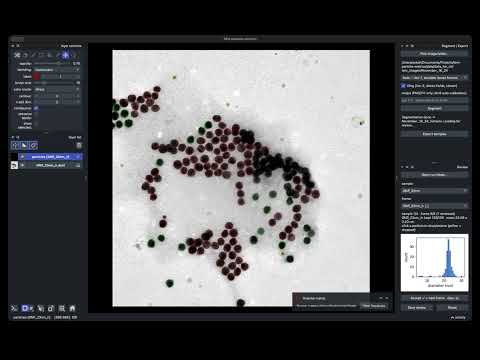](https://youtu.be/t74QXefrVq4) Raw micrographs and measurements are lab data and are never committed to this repository. ## Quick start (fresh machine) The desktop app — **segment → review → export** in one napari window — runs from a single conda environment. From a clean Mac or Windows machine: 1. **Install Miniforge** (conda): https://github.com/conda-forge/miniforge (Mac: the `MacOSX-arm64` installer; Windows: the `Windows-x86_64` `.exe`). 2. **Get the code** — `git clone https://github.com/e-stella/tem-particle-metrics` (or download the ZIP), then `cd tem-particle-metrics`. 3. **Build the environment** (downloads torch + napari — a few minutes, a few GB): - **macOS / Linux:** `bash scripts/make_app_env.sh` - **Windows** (from the *Miniforge Prompt*): `conda env create -f environment.yml` 4. **Run the app:** ```bash conda activate tem-app python gui/napari_app.py ``` In the app: **Pick image folder** → choose a tier (Tier 1 fast / Tier