DOMinion
Online articles are full of unverified claims, missing context, and jargon that goes unexplained.
Core trick
A Chrome extension sends article text to Gemini, which runs Google Search grounding per claim and returns annotations anchored to text spans.
Description
Online articles are full of unverified claims, missing context, and jargon that goes unexplained. Readers have to fact-check things themselves, open a dozen tabs, and still walk away unsure what's true.
DOMinion is a Chrome extension that brings something like Community Notes to every article you read, except it's instant and powered by AI research instead of waiting for crowdsourced votes. Click the extension, and it scans the article and annotates it with four types of highlights:
Each annotation pulls from both the article itself and from other articles the agent researches in real time. Hover any highlight to see a summary. Click it to start a conversation and dig deeper. It works on news, opinion pieces, and arXiv papers.
**Built with:** Gemini LLMs (3.1 Flash Lite for speed or Pro for thoroughness depending on the article's complexity), Google Search grounding, Chrome Extensions API.
README excerpt
<div align="center"> <img src="assets/dominion_logo.webp" alt="DOMinion logo" width="220" /> </div> # DOMinion AI-powered Chrome extension that analyzes web articles and annotates them inline with fact-checks, context, explanations, and source analysis. ## Demo [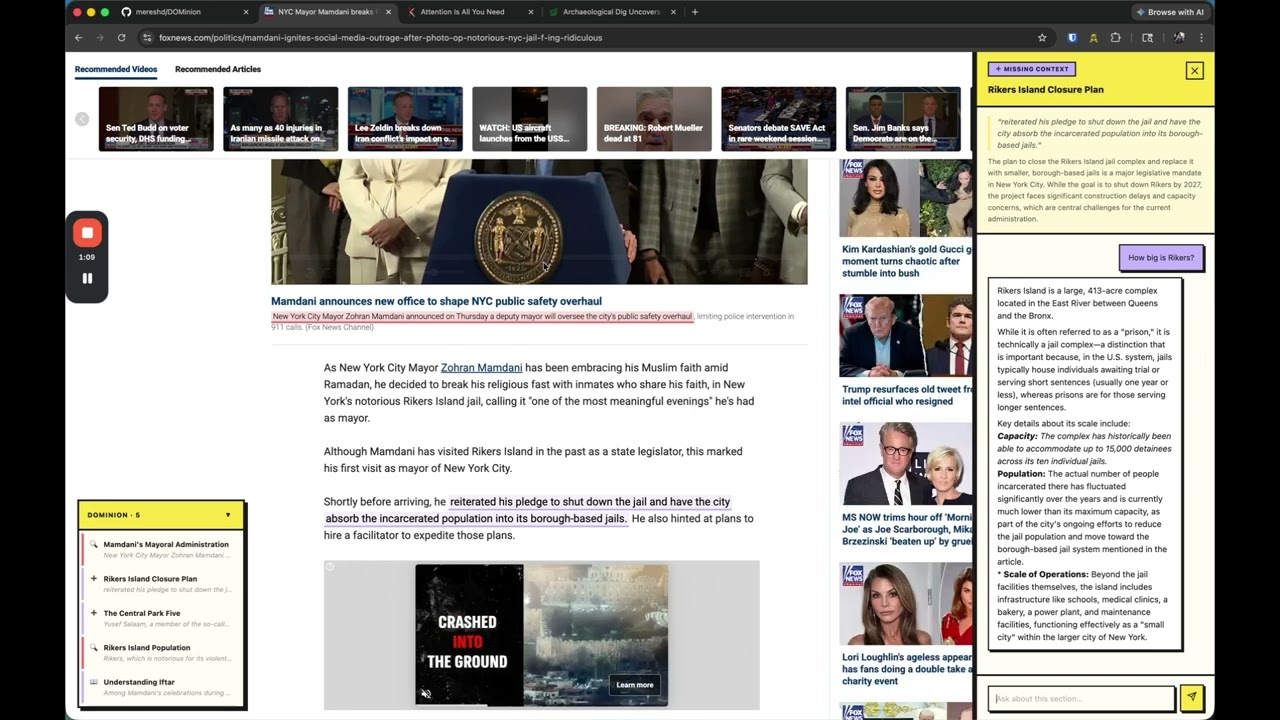](https://www.youtube.com/watch?v=eSXUzZdpvdc&t=1s) ## Features - **Smart Highlights** — Automatically identifies claims, jargon, sources, and missing context in any article - **Research Tooltips** — Hover any highlight to see AI-generated analysis backed by Google Search - **Deep Chat** — Click any annotation to open a chat panel for follow-up questions - **Selection Analysis** — Select any text and choose an annotation type from the context menu - **Annotations TOC** — Floating table of contents listing all annotations with click-to-scroll - **Persistent Cache** — Annotations, chat history, and user highlights survive page refresh and browser restart - **Dismiss & Clear** — Remove individual annotations or clear all at once - **Multi-Provider Support** — Choose between Gemini, OpenAI, and Claude with per-provider model selection ## Setup 1. Clone this repo 2. Open `chrome://extensions` in Chrome 3. Enable **Developer mode** (top right) 4. Click **Load unpacked** and select the **repository root** (the folder that contains `manifest.json`, not `extension/` alone) 5. Click the DOMinion icon in the toolbar 6. Select a provider (Gemini,